Free Online Website Security Testing Tools

M Chetmars
Author
You’re Not Searching for Tools. You’re Searching for Reassurance.
When someone searches for “website security testing tools online free,” they’re rarely building a research spreadsheet.
They’re worried.
The instinct is natural:
Find a tool. Run a scan. Get an answer.
Free scanners are a useful place to start.
Here Are the Best Free Website Security Testing Tools:
If you’re looking for legitimate, widely used free tools you can run immediately, these are among the most trusted:
Sucuri SiteCheck
SSL Labs
Mozilla Observatory
ImmuniWeb
Each of these tools provides real diagnostic value. None of them provide full security coverage.
Before you rely on any of them, understand what they are actually testing.
Tool Comparison Table
Tool | Strengths | Weaknesses |
Sucuri SiteCheck | Detects visible malware, blacklist status, injected spam | External scan only; cannot access server-side logic |
SSL Labs | Deep SSL/TLS configuration analysis and grading | Limited strictly to encryption layer |
Mozilla Observatory | Excellent HTTP header evaluation and security scoring | Does not test application logic or authentication flows |
ImmuniWeb (Community Scan) | Detects common web application vulnerabilities | Free tier limited in depth and scope |
Now we move beyond listing.
Because the real risk isn’t what these tools show.
It’s what they don’t.
What These Tools Actually Test

All five tools operate externally. They scan what is publicly visible and compare those signals against known vulnerability databases. This includes SSL configuration, exposed software versions, missing security headers, blacklist status, and detectable malware signatures.
That layer of inspection is valuable because perimeter weaknesses are easy to exploit at scale. An outdated TLS configuration can instantly reduce browser trust. Missing headers can weaken client-side protection. Publicly visible malware can damage SEO before you even realise it.
But this entire inspection model is reactive. It depends on known patterns and visible exposure. It does not evaluate how your system behaves when inputs are manipulated or workflows are stressed. It confirms configuration hygiene, not architectural soundness.
And that distinction becomes critical the moment your website handles real data.
Read More: Security Threats Web Devs Are Facing In 2026
The Behaviour Gap

Security failures rarely begin with obvious misconfigurations. They emerge from behaviour.
An authentication process might technically work — but allow unintended privilege escalation. An API endpoint might function correctly — but lack rate limiting under automated abuse. A form might validate most inputs — but inconsistently sanitise edge cases.
Free scanners do not understand your application’s decision rules. They cannot evaluate how user roles interact with one another. They do not simulate chained exploitation scenarios where multiple minor weaknesses combine into a major breach.
That gap between visible health and behavioural resilience is where most organisations overestimate their security posture.
Security maturity requires a more demanding standard.
Instead of asking whether obvious issues exist, resilient organisations ask whether their system has been stress-tested under adversarial thinking. Clean reports reduce uncertainty; they do not eliminate structural exposure.
When leadership equates visibility with protection, risk silently accumulates.
That is the psychological inflection point where reassurance replaces rigor.
When Free Tools Are Actually Enough
Not every website requires deep penetration testing.
If your site is static, does not store user data, does not process payments, and has minimal dynamic functionality, periodic free scans may be sufficient for baseline hygiene. In those cases, the attack surface is small and the business impact of failure is limited.
But the equation changes as soon as your site includes user accounts, transactions, CRM integration, or operational workflows. Once data flows through your system, the risk profile changes from inconvenience to liability.
Security should scale with dependency.
If revenue, reputation, or compliance depend on your platform, surface scanning becomes incomplete by definition.
At that point, the question is no longer “Is this free tool good?”
It becomes “Is this level of testing proportional to my exposure?”
Read More: Is Web Design Different from Web Development?
What Should You Do After Running a Free Security Scan?
A free security scan helps you find visible problems, but it is only the tip of the iceberg. After that, you should prioritise any critical found issues, put some time on the recommended fixes, and run the scan again after making all the suggested changes. If the website handles customer data, payments, or custom functionality, you should run the periodic scan as one layer of your overall security strategy.
After the Scan | Why It Matters |
Review critical warnings first | Focus on the highest-risk issues before minor recommendations. |
Verify and apply fixes | Confirm the reported issues before making changes. |
Run another scan | Check that the problems have been resolved. |
Schedule regular scans | New vulnerabilities can appear as software changes over time. |
Consider deeper testing for complex sites | External scanners cannot evaluate business logic, permissions, or custom workflows. |
The Role of Continuous Monitoring

Another limitation of most free tools is frequency. They are usually run manually. You decide when to scan. You interpret the report. You move on.
Attackers do not operate on your schedule.
Real resilience depends on continuous monitoring, alert systems, and layered protection. It requires integration into your development workflow, not occasional external inspection.
When security becomes part of your web development lifecycle, issues are detected earlier.
Free scanners are episodic.
Security engineering and web maintenance is ongoing.
That difference is what separates awareness from architecture.
Read More: What is a Dynamic Web Page? (with Example)
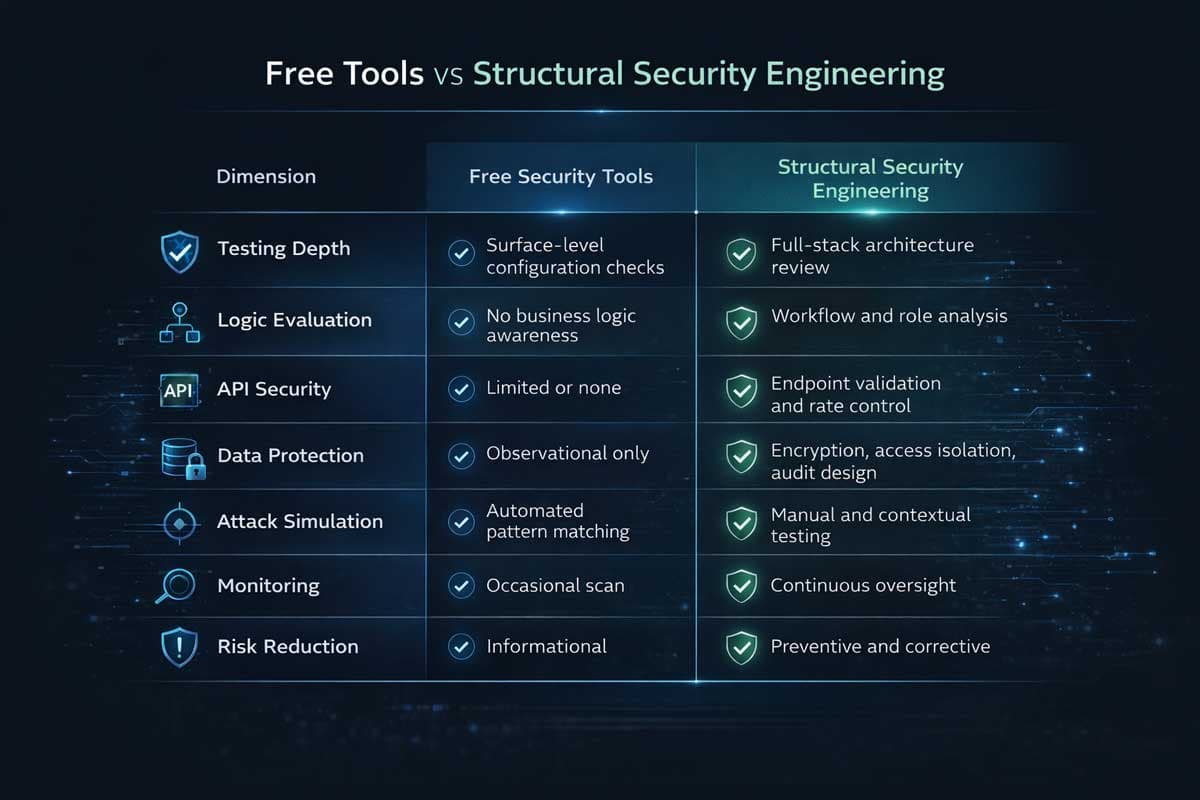
Free Tools vs Structural Security Engineering
Dimension | Free Security Tools | Structural Security Engineering |
Testing Depth | Surface-level configuration checks | Full-stack architecture review |
Logic Evaluation | No business logic awareness | Workflow and role analysis |
API Security | Limited or none | Endpoint validation and rate control |
Data Protection | Observational only | Encryption, access isolation, audit design |
Attack Simulation | Automated pattern matching | Manual and contextual testing |
Monitoring | Occasional scan | Continuous oversight |
Risk Reduction | Informational | Preventive and corrective |
Free tools detect what is visible.
Engineering addresses what is exploitable.
One reacts to known patterns.
The other anticipates behaviour.
The difference is not about budget. It is about scope.
The Decision Threshold

There is a practical way to determine whether free tools are enough.
Ask three questions.
Does your website store sensitive customer data?
Does your platform generate direct revenue?
Would a breach meaningfully damage brand trust?
If the answer to any of these is yes, you are operating above the free-tool threshold.
At that level, security is no longer a diagnostic exercise. It becomes part of the development strategy.
Security cannot be detached from architecture once exposure passes a certain scale.
Final Perspective: Visibility Is Not Security
Searching for website security testing tools online free is rational. It shows awareness.
But awareness is not architecture.
Free tools show you what is externally visible. They confirm whether obvious misconfigurations exist. They reduce uncertainty at the perimeter. That is useful — especially for low-risk sites.
But the moment your platform handles transactions, user accounts, integrations, or business-critical workflows, security becomes inseparable from development itself. It must be embedded in how your web development is structured, how your database administration is controlled, and how your business intelligence depends on clean, protected data flows.
Frequently Asked Questions
1. Are free website security testing tools enough for a small business?
They can be sufficient for low-risk, static websites that do not process sensitive data. But as soon as your site stores user information, handles payments, or integrates with other systems, free tools alone are not proportionate to the exposure.
2. If a free scan shows no issues, can I assume my site is secure?
No. A clean report only confirms that no known, externally visible misconfigurations were detected. It does not validate internal logic, role permissions, API security, or workflow resilience.
3. What is the real difference between vulnerability scanning and security engineering?
Vulnerability scanning is automated pattern detection. Security engineering evaluates architecture, behaviour, integrations, and logic. One identifies known weaknesses; the other designs systems to resist exploitation.
4. When should a business move beyond free tools?
When digital operations become revenue-dependent, data-sensitive, or integration-heavy. At that point, security must align with development strategy rather than remain an occasional diagnostic step.
5. Is investing in structured security testing only for large companies?
No. It is for companies whose digital systems matter. Size is less relevant than exposure. A small SaaS platform with sensitive data may need deeper security practices sooner than a large static brochure site.
6. Can free security scanners remove malware?
No. These tools only can find some problems that are easy to find. To remove malwares and fix the bugs, you need better tools that can have access to the server or website.

Admin
Mostafa is a Wordsmith, storyteller, and language artisan weaving narratives and painting vivid imagery across digital landscapes with a spirited pen, he embraces the art of crafting compelling content as a copywriter, and content manager.

Based in
Melbourne, Australia
Your software dev partner, smooth process, exceptional results
Contacts
contact@flamincode.com.au
© All rights reserved to Flamincode