Best AI Based Website Builder: Smart Tools or Just a Starting Point?

M Chetmars
Author
Artificial intelligence has entered nearly every corner of digital creation — and website design is no exception. In the past few years, AI website builders have promised to do the impossible: generate a professional, fully functional website in minutes. With just a few prompts, you can now get layouts, images, and even SEO-ready content without touching a single line of code.
But here’s the truth most people discover soon after: these tools are fast, but they aren’t flawless. They’re amazing for testing concepts, creating prototypes, or visualizing your ideas — yet far from replacing what a real design and development team can deliver.
Still, they’ve come a long way, and using them wisely can help you communicate your vision before investing in full production.

Imagine a café owner in Melbourne typing a short prompt — and in less than a minute, having a fully designed homepage with menu, photos, and a contact form. It feels like magic, but it’s not design — it’s automation. So, this illusion of completeness often misleads business owners into skipping the strategic phase.
Let’s look at the best AI-based website builders in 2025 — and where they shine, where they fall short, and how they can fit into a truly professional workflow.
Comparison Table: Popular AI Website Builders (2025)
Tool | What It Does Well | Where It Falls Short | Best Use Case |
Wix AI | Fast setup, flexible editor, AI text & image tools | Feels “template-like,” limited originality | Draft ideas for business sites |
Squarespace AI | Polished visuals, strong brand structure | Little layout freedom, closed system | Mockups for creative projects |
Hostinger Builder | Cheap, easy, AI copywriting | Minimal customization | Simple concept sites |
Framer AI | Modern motion design, quick prototypes | Requires design sense | Visual agency or creative previews |
Durable | Generates whole sites fast | Surface-level content | Early-stage business ideas |
10Web (AI + WordPress) | Integrates with WordPress plugins | Requires technical comfort with the WP ecosystem | Semi-pro mockups for developers |
Jimdo Dolphin | Simplest guided creation | Outdated design limits | Quick proof-of-concept demos |
Familiar, flexible CMS | Still early in AI features | Blog or content concept previews |
What Is an AI Website Builder Really Doing?
An AI website builder is basically a bunch of algorithms that have been trained to copy how people design things. You tell the AI what you want, like "a sleek website for a digital agency in Melbourne," and it figures out how to make it look, how to use colours, fonts, and even text.
This technology is interesting and saves a lot of time. The AI looks at patterns from thousands of existing websites and makes a guess about how your layout should look.
At first glance, these tools seem like a miracle — but every shortcut hides trade-offs. The faster your site is born, the less personal it tends to be. Understanding how these tools really work helps you use them wisely instead of blindly.
But here’s the catch: it’s not creating something truly unique — it’s remixing what already exists. You get a quick start, but not a masterpiece.
If you’re a designer, developer, or marketer, this makes AI builders great for ideation, not final production. Think of them like digital sketchpads — fast, disposable, and surprisingly helpful.
Read More: Top Melbourne Web Design Trends for Better Conversions in 2025
Why AI Builders Are Useful — but Not Enough

There’s no denying the benefits. AI builders are fast, affordable, and easy to use. For a small business owner or startup founder, that can be life-changing. You can literally go from “idea in your head” to a shareable draft in under an hour.
That’s why many creative teams use them as brainstorming tools. Instead of explaining what you want, you show it — even if it’s rough.
However, once the conversation shifts to real brand experience, user flows, SEO depth, and long-term scalability, AI reaches its limits.
Let’s be clear:
AI doesn’t know your brand voice or visual identity.
It can’t plan UX journeys or conversion funnels.
It doesn’t build backend logic or integrations.
That’s why AI builders should be your first step, not your last.
The Top AI Website Builders in 2025
Wix AI
Wix has evolved its “ADI” (Artificial Design Intelligence) into a solid assistant for small projects. It can generate entire sites and fill them with auto-written content and images. For testing layouts or showing your team a rough concept, Wix AI is one of the most complete options. But it still feels formulaic — every result looks like a Wix site.
Use it for: rapid concept visualization, not final branding.
Squarespace AI (Blueprint)
Squarespace’s AI takes elegance seriously. It shows you how to make colours, fonts, and sections that all look good together. Great for showing clients or coworkers how to be creative, especially if design is more important than customisation.
Use it for: sleek visual mockups.
Limit: not ideal for experimentation or advanced functionality.
Hostinger Website Builder
Affordable, fast, and light. It’s one of the simplest ways to prototype a homepage or small site idea. But Hostinger’s AI can’t go beyond basics — you’ll outgrow it quickly once you want control.
Use it for: startup landing pages or proof-of-concept demos.
Framer AI
Framer is a designer’s dream — fast, modern, and filled with visual motion. With AI generation, you can type your idea and watch it become an interactive layout.
Use it for: pitching creative concepts or motion prototypes.
Limit: takes skill to polish beyond the draft stage.
Durable
Durable claims you can “build a website in 30 seconds.” That’s true — but you’ll spend the next hour refining it. Still, for quick idea visualization or business pitches, it’s an excellent choice.
Use it for: entrepreneurs or agencies that need instant mockups.
10Web (WordPress-based)
A hybrid model: AI generation meets WordPress freedom. It’s great for those who plan to rebuild the concept later in full WordPress.
Use it for: semi-professional demos or client previews.
Limit: setup and hosting require technical comfort with the WordPress ecosystem.
Jimdo Dolphin
A minimalistic AI builder for personal or local business sites. It’s too limited for complex projects but ideal for basic layout sketches.
Use it for: small mockups or low-budget visuals.
WordPress.com AI
This new addition uses AI to make blog posts and layouts. It is still changing, but it is helpful for writers and agencies who want to quickly show how content is structured.
Use it for: blog or educational site demos.
Why Human Designers Still Matter
This is where reality sets in: no matter how smart an algorithm is, it can't think like a person. A professional design and development team can give you something that AI can't: context.
People know how to set business goals, feel emotions, and tell stories.
Designers turn psychology and culture into movement and layout.
To make things work, developers connect the logic of the front end and the back end.
Marketers create real brand voices that no AI text generator can fully copy.
AI builders are like calculators: they can do a lot, but it depends on who uses them. A great team uses AI as a partner, not a replacement.
When your project needs personality, strategy, or technical depth, that’s where people outperform code every single time.
Read More: The Best Engineering Website Design Ideas in 2025
Pros and Cons of AI Builders in Real-World Projects
Pros | Cons |
Speed: Instantly turn a brief idea into something visual. | Not enough depth: no real UX research, analytics, or scalability. |
Accessibility: You don't need to know how to design or code. | Generic Results: Sites that look the same to different users. |
Affordable: Great for trying out ideas before spending money. | No emotional design means missing the "soul" of brand storytelling. |
Collaboration: Good for groups—show what you mean, don't just talk about it. | Not having advanced SEO means not having a content strategy or backlinks that are made by people. |
Platform Lock-in: Hard to migrate results into professional frameworks later. |
AI saves time in the early stage — but still requires human refinement for anything meaningful.
How to Use AI Builders the Smart Way
Here's the best way to do things if you're working on a real project:
Begin with AI: Use tools like Wix AI or Framer to make two or three versions of your idea.
Tell your team: Talk about the structure, tone, and content direction using those drafts.
Refine by hand: Have your designer or developer use professional tools to rebuild it.
Keep AI in the loop: Use AI again to make small changes, mockups, or layouts for A/B tests.
This method lets you have the best of both worlds: the speed of machines and the depth of human creativity.
Read More: 15 WordPress Design Inspirations That’ll Make You Go Wow!
Beyond Automation: Advanced SEO for AI-Assisted Websites

The shift towards AI-assisted content creation means that basic SEO is no longer enough. To succeed, advanced strategies focused on proving authority, improving machine readability, and capturing conversational search intent are critical.
Here is a breakdown of advanced SEO for AI-Assisted Websites, focusing on E-E-A-T, Schema Markup, and Long-Tail Keywords.
1. Establishing Unimpeachable E-E-A-T (Experience, Expertise, Authoritativeness, Trustworthiness)
Google's E-E-A-T signals are the primary defense against being categorized as low-quality, generic AI content. Your strategy must demonstrate that a human expert is behind the work.
E-E-A-T Component | Advanced Strategy for AI Content |
Experience | Inject First-Hand Proof: The AI draft is a starting point. A human expert must add original photos, screenshots, case studies, and unique data that only someone with direct experience would have. |
Expertise | Expert Vetting and Bylines: Make sure that every piece of content has a detailed author byline that shows their real, specific credentials. Have a qualified expert (like a doctor or financial advisor) read, edit, and sign off on the content for complicated topics (YMYL - Your Money or Your Life). |
Authoritativeness | Get Topical Authority: Make your site into deep, interconnected topic clusters, with Pillar Pages that link to several supporting articles. Use AI to quickly make the supporting content, but make sure the pillar content is a human-curated, trustworthy guide. |
Trustworthiness | Citing and being open: Be honest about where you get your data. Check the facts of all claims made by AI and include specific, dated citations. Make sure there is clear contact information, privacy policies, and a date that says "Last Updated." |
2. Leveraging Structured Data (Schema Markup) for AI Consumption
AI models (including those powering generative search results) thrive on structured data because it eliminates ambiguity. Schema markup is your way of telling the AI exactly what your content is.
Schema Type | Purpose for AI-Assisted Content |
Article or BlogPosting | Clearly defines the type of content, the author's credentials (boosting E-E-A-T), and the publish/update date. |
FAQPage | A critical signal. Mark up sections with clear questions and concise, direct answers. This makes your content a good fit for Google's "People Also Ask" (PAA) and AI Overviews (AIO). |
HowTo | This schema gives AI models a clear structure to follow when parsing and summarising AI-assisted content that is a tutorial in search results. |
Product / Review | This is a must-have for online shopping. It tags certain product details, prices, and customer reviews, which AI then uses to suggest products and show featured snippets. |
Organization / Person | This tells who is behind the content (your brand or expert), which directly supports Trust and Authority signals. |
3. Dominating with Long-Tail and Conversational Keywords
Generative AI search is conversational. Users phrase their queries as full questions or complex requests. More specific long-tail keywords align perfectly with this shift.
Strategy | Actionable Steps for AI SEO |
Target Conversational Intent | Use your AI tools to research question-based queries (How do I...?, What is the best way to...?, [Product] vs [Competitor]?). Structure your content with these questions as H2 and H3 headings, immediately followed by a concise answer. |
Semantic Keyword Clustering | Move beyond single keywords. Use AI to identify clusters of semantically related long-tail terms that cover a topic comprehensively. Create one piece of content that addresses the entire cluster, demonstrating a deep, authoritative understanding. |
Optimize for Voice Search | Since voice queries are typically longer and more natural (e.g., "Siri, find the most durable running shoes for trail use under $150"), ensure your content is structured to answer these specific, lengthy questions directly and naturally. |
Leverage Entity Recognition | When using AI to draft content, ensure it frequently mentions and links to related entities (people, places, products, or concepts) and not just keywords. This helps the AI models map your content to the broader knowledge graph. |
The Future: Collaboration, Not Competition
It's not AI versus humans in the future of web design; it's AI with humans. AI tools will keep getting better at making cleaner layouts, writing better content, and even figuring out what people want to do when they visit a website. But people will always need to guide creativity.
The best websites of the future won't be made entirely by AI. Instead, they will be made with the help of AI and guided by strategy, psychology, and empathy. Design firms that use this hybrid model—using AI to make a prototype and then refining it by hand—will do better than both pure AI builders and traditional workflows.
Final Thoughts
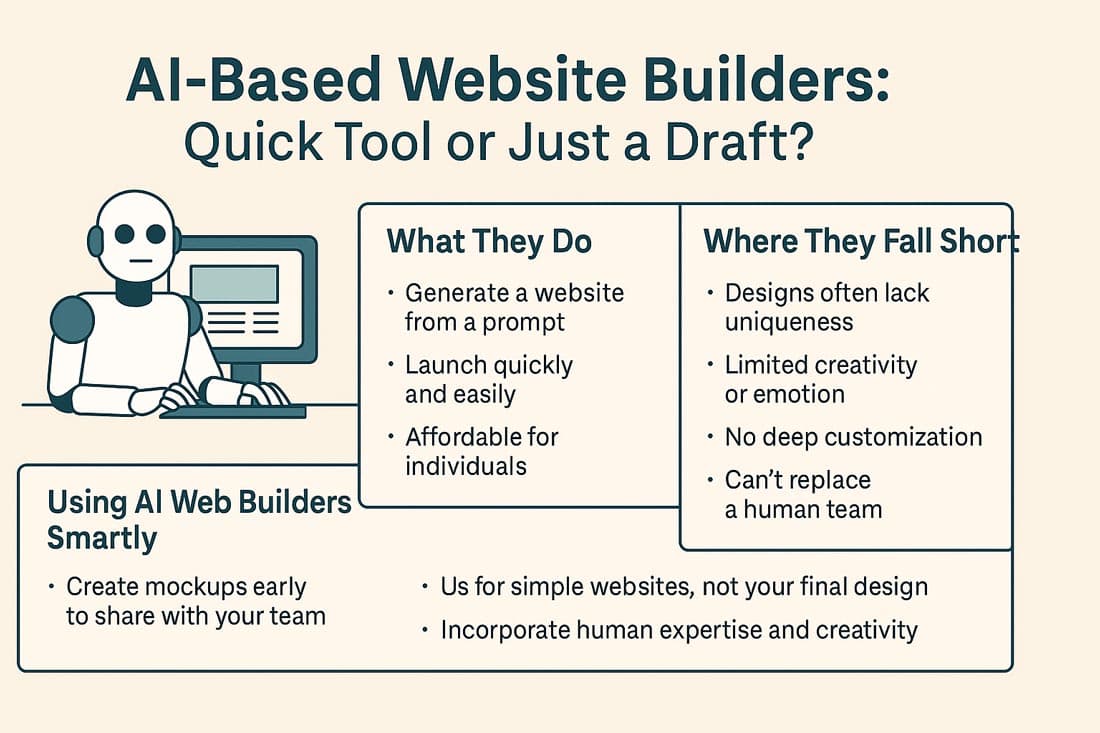
AI website builders are great for what they do. They are quick, easy, and helpful for drawing out your ideas, making demos, or seeing your vision.
But that's where their magic ends.
A website that really works for your business, represents your brand, and turns visitors into customers still needs people to work on it.
So, start with these AI tools. Come up with your idea, share it with your creative team, and then let professionals make it into something that will last.
AI can help you imagine your future website — but humans are still the ones who bring it to life.
Frequently Asked Questions (FAQs)
Should I build my site with AI or hire a team?
Use AI for mockups or temporary pages. For serious branding, scalability, and SEO, human teams deliver far better results.
Can I export or edit an AI-generated site later?
Some tools allow limited export, but most are platform-locked. Treat AI sites as drafts, not final products.
Are AI sites SEO-friendly?
They’re optimized on the surface, but true SEO involves content strategy, backlinking, and analytics — all human tasks.
Which AI builder is best for testing ideas?
Wix AI and Framer are the most flexible for early-stage experimentation.
Will AI ever replace web designers?
Unlikely. AI will automate routine design work, but the art of brand storytelling and UX strategy will always need people.

Admin
Mostafa is a Wordsmith, storyteller, and language artisan weaving narratives and painting vivid imagery across digital landscapes with a spirited pen, he embraces the art of crafting compelling content as a copywriter, and content manager.
Comments

AI website builders are cool for quick prototypes, but they can't replace the depth a real designer brings.
Replies

@Callahan It's more of a tool to enhance, but not replace...yet.

Based in
Melbourne, Australia
Your software dev partner, smooth process, exceptional results
Contacts
contact@flamincode.com.au
© All rights reserved to Flamincode