Website Wireframe vs Mockup: What’s the Difference Before Design Approval?

M Chetmars
Author
A website design project usually doesn’t go wrong because the design is bad; it runs into trouble because the wrong things get approved at the wrong time.
It usually happens in a scenario like this:
The designers sent the client a wireframe, and the client began discussing the colours. Later, a mockup is sent, too. And it changes the subject of the discussion to the page structure again. It happens several times. And at the end of the week, nobody is still sure what is actually approved, and what is not.
The result? Easy to guess: extra meetings, extra revisions, more delays.
If you’re planning to have a new website, it’s really crucial to know the difference between a wireframe and a mockup to prevent any confusion:
A wireframe is used to approve how a page works, but a mockup is used to approve how a page looks.
Area | Website Wireframe | Website Mockup |
Purpose | Validate structure and content flow | Validate visual direction |
Focus | Layout, hierarchy, CTA placement | Colour, typography, imagery, spacing |
Question being answered | Does this page make sense? | Does this page feel right? |
Approval focus | User journey and page logic | Readability, trust, and brand alignment |
Project stage | Before visual design | Before development |
This might sound like a small difference, but it’s not.
A business website is more than just a collection of pages. It must act as a decision-making tool. All pages must offer something to the visitor.
When discussions about the approval focus on the appearance, sometimes structural issues might start to appear in the development. On the other hand, when the structural approval takes too long, sometimes designers have to redesign some parts, if not all.
Either of these situations costs time.
And sometimes, these issues distract designers and developers from the main questions:
Can visitors understand the service?
Can they easily find the data they need?
Can they go effortlessly towards the desired actions?
These are much more crucial than the colour of buttons.
Why Wireframes and Mockups Exist

Still, many business owners think it’s just like that: a designer creates a visual design, and everything is going to work like a real website. But in reality, making a website has several stages of decision-making. Why? Because a website is created to solve multiple problems at the same time.
Pages need logical structures. Content needs a hierarchy. Crucial information must be shown in the right order. Calls to action must be bold and visible enough. And trust signals must be somewhere to support the users in making a decision.
The visuals only become important when all the criteria are in place.
And this is the main reason wireframes and mockups exist as separate deliverables.
This separation helps the client review each part independently. Without this, the decisions might become unorganised and messy.
A review of the fonts might focus on functionality, and a review of the image choice might turn into a discussion of user flow.
This is how the project might move forward, but the crucial decisions might stay unsolved.
What a Website Wireframe Is Really Trying to Prove
If you want a really helpful description of a wireframe, we shouldn’t focus only on how they look.
They matter because they are important for testing.
A wireframe tries to prove that the page structure works before designers enter the conversation.
Take a service page for a software company as an example.
The visitor is there because of a problem. Firstly, they should understand what the company does. Then, they should understand if the service is relevant. Next, they will check if the company is credible.
The wireframe exists to answer these questions:
Is the service understandable early enough?
Does the page build trust for the visitor?
Is the order of important sections right?
Will the visitor understand what they should do next?
These questions are not answered by designers. They work on the website's appearance: colours, shapes, and typography.
But the page will fail to deliver if the visitor doesn’t understand the offer.
Experienced teams usually spend a lot of time on structural decisions before they start making decisions about the project's appearance.
Making changes to the wireframe is easy, but spotting them after the development phase will be costly.
Read More: How to Plan Your Website Structure Before Design Starts
What a Website Mockup Is Really Trying to Prove
After approving the structure, it’s time to check if the pages can communicate effectively.
This is where the mockup matters.
The mockup will take the structure and form the visual design. Colours, typography, spacing, visual hierarchy, and brand direction all start to work together.
At this point, the website will look like a real website.
It’s probably the easiest stage for business owners to decide because the design is something tangible.
You can see whether the website accurately reflects the brand.
You can identify readability issues before starting the development phase.
You can check if the important information is bold enough to stand out.
So, at this point, you shouldn’t redesign the page structure. The structure was fixed before.
If a mockup discussion comes to the point that the user journey should be altered, you must know that an important step has been skipped in the process.
Wireframes and mockups have different purposes: one is for validating the plan, and the other is for validating the presentation.
Wireframe vs Mockup: The Difference That Matters Most
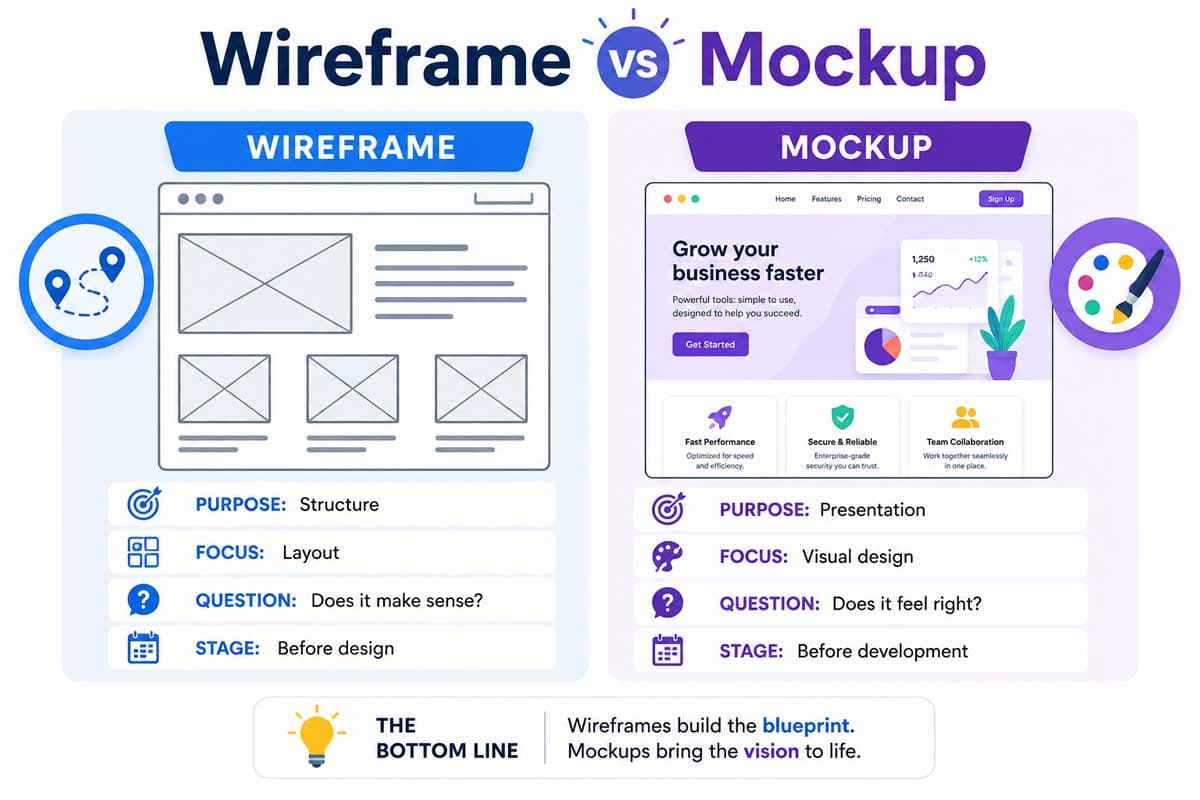
It’s really easy to understand the technical differences between wireframes and mockups.
A wireframe helps a team decide if a page deserves to be built, and a mockup helps them understand if the page is presented properly.
One is for logic, and the other is for communication.
When both are set correctly, the development process will be very organised.
But if they are mixed together, approval will be subjective, confusion will arise, and the project will be delayed.
Which One Comes First in a Website Design Project?
The order is usually clear:
The website planning comes first. Next is the wireframe. The mockup follows.
After all of these stages, the development phase begins.
This order exists because of a practical reason.
Structural decisions are usually cheaper, faster, and easier to change than visual ones.
And visual decisions are easier to change than developed functionality.
If a business owner approves a wireframe, they have approved the strategy. If they approve a mockup, they have approved how this strategy will be presented.
After these matters are approved, the development phase will be predictable and certain.
And if not, the project will be trapped by multiple revision sessions.
A designer changes the visuals, then the client asks for alterations to the structure. After applying the structural changes, the design must be adjusted again.
These are not cheap. These are not some things that you can get done in seconds.
Read More: Why Your Small Business Website Needs a Redesign (Immediately!)
What Should You Check Before Approving a Wireframe?
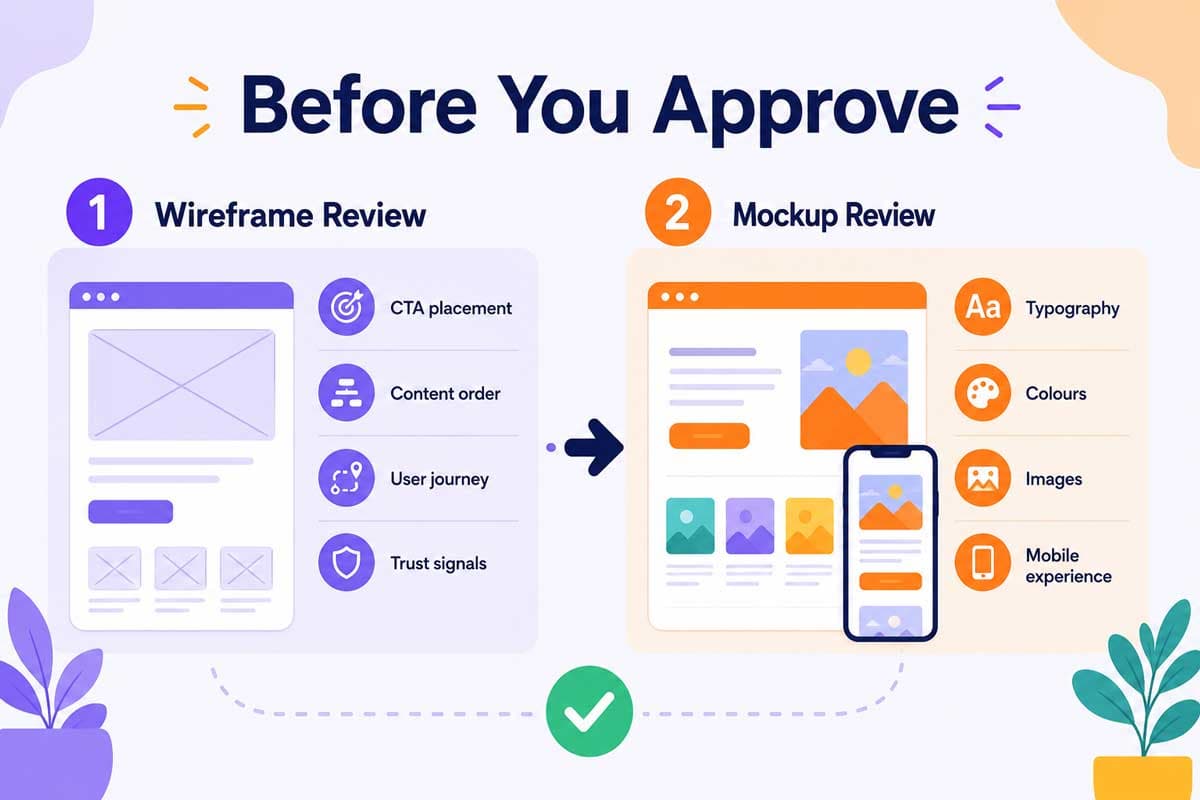
A wireframe is a business tool, not a design concept.
Their main objective is to support the visitor journey.
Is the Main CTA Easy to Find?
All the important pages should lead the user to the next step. This doesn’t mean that we should have numerous calls to action everywhere. It just means that the user should be able to find it easily.
When checking a wireframe, look at where the primary action appears. If someone wants to take your desired action, they should be able to find the path effortlessly.
Some business owners focus on messaging so much that they bury the main message.
A good wireframe prevents a business from falling into this trap.
Are the Important Sections in the Right Order?
The information order has a significant impact on how the users will make decisions.
Not all users have time to read a website page from top to bottom. People usually just scan. They jump between actions, looking for the signals that answer their questions.
A service page, for example, works better if the user understands the main service before going to the details. Also, trust signals usually work better when they are presented right before contact forms.
The correct order may depend on the business type, but the underlying logic should always be clear:
Every step should prepare the user for the next step
Does the Page Support the User Journey?
One common problem you sometimes face is that a business has developed its website around company information rather than what users need and how they think.
Visitors arrive on a page uncertain. They want answers. A well-structured wireframe helps them go through a set of decisions. They check relevance, credibility, and options, and at the end they decide whether you are the best option for them.
When reviewing a wireframe, you should ask yourself if the page supports the decision-making.
If important questions remain unsolved, the structure needs refining.
Are Service Details, Proof, and Contact Points Clear?
Many businesses assume that potential visitors will call them for more information. But in real life, visitors usually decide whether to call based on the information provided on the page.
A good structure specifies enough space for decisive information, FAQs, case studies, testimonials, and trust signals.
But at the same time, the structure doesn’t have to persuade everyone to take the desired action.
It should just focus on the right people for the business.
What Should You Check Before Approving a Mockup?
After approving the structure, attention should shift to the communication.
The mockup stage determines whether the design presents the business in a desirable way.
Does the Design Match Your Business Positioning?
Any business needs its specific visual signals.
The visual signals of a law firm are different from those of a medical clinic. A construction company communicates differently from a software company.
When reviewing a mockup, you should consider whether the visuals align with your business type.
An attractive design does not necessarily send the right signal for your business.
It’s not about your personal preferences; it’s about the position you want to take in the market.
Is the Typography Readable?
Headings should be easy to scan, body text should be easy to read, important information should stand out, and typography shouldn’t be the main thing for the reader to focus on.
Readability affects every page.
A good mockup should make reading as easy as possible.
Are Colours Supporting Trust and Clarity?
Psychologically, colours affect the users’ attention.
They identify actions, priorities, and navigation formation.
It’s not only about having different colours; it’s about using colours that give the right signals to support making the right decision.
Important buttons should stand out, while the main text should be readable.
Every colour should support this idea that the page must be easy to understand.
Do Images and Visual Elements Support the Message?
Images must make the communication more effective.
When reviewing the mockup, keep in mind that all the imagery should make it easier for the viewer to better understand the business, the service, or the outcome.
The same goes for the icons, illustrations, and supporting graphics.
Everything must take its place with a purpose.
Is the Mobile Experience Considered?
It’s obvious that most of the traffic comes from mobile users.
Working well on big screens is not enough. It must look and work well on phone screens, too.
When checking the mockup, consider reviewing the mobile version as well. This must be done before the development phase, not after it.
Common Mistakes Clients Make During Design Approval
Most mistakes are predictable. Some clients only focus on the look of the website. Some approve the wireframe without trying it on a phone.
Some focus only on their personal preferences rather than on their business.
The most expensive mistake is to approve these assets without understanding what you are trying to achieve.
A wireframe must be judged by its structure, and on the other hand, a mockup must be judged by its communication ability.
Separating them by their responsibilities usually benefits you and the developers by better organisation, fewer revisions, and quicker development.
How Flamincode Uses Design Planning Before Development

We don't treat design approval as a formality. It’s a part of the planning process.
The structure must support the business’s goals; the visual design must support the business’s message.
Both must be totally clear before any code is written.
This approach decreases uncertainty during the development phase and helps the client to come up with more useful feedback.
For service businesses, the website must explain the services, build trust, and eventually generate more leads.
If you are planning a new business website and want guidance before development begins, book a website design consultation with Flamincode web development team.
Frequently Asked Questions
What is the difference between a wireframe and a mockup?
A wireframe is a tool for showing how a web page will work, including page structure, content, and user flow. A mockup is a tool for showing what the website will look like, including visual design, colour, and imagery.
Do I need a wireframe before a website mockup?
Yes, in many businesses you need it. Because it shows how the webpage will work before moving to the next step, which is visual design.
Is a website mockup the same as a prototype?
No. A mockup is a static design, while a prototype shows how you can interact with the design's elements.
What should I approve in a website wireframe?
Content order, section organisation, CTA placement, user flow, and overall page structure.
What should I approve in a website mockup?
Visual style, Brand alignment, readability, mobile experiment, and overall clarity.

Admin
Mostafa is a Wordsmith, storyteller, and language artisan weaving narratives and painting vivid imagery across digital landscapes with a spirited pen, he embraces the art of crafting compelling content as a copywriter, and content manager.

Based in
Melbourne, Australia
Your software dev partner, smooth process, exceptional results
Contacts
contact@flamincode.com.au
© All rights reserved to Flamincode